Trigger conditions let you run an integration only when a response meets rules you define: a minimum score, a specific answer, a filled email field. This guide covers every operator you can use and includes examples you can adapt to your own form.
You will find the Trigger condition field when configuring an integration in the form’s Integrate tab. Leave it blank and the integration runs for every response. Add an expression and the integration runs only when that expression is true for the submitted response.
How an expression is built
An expression combines a placeholder (your data), an operator, and usually a value. In the Trigger condition field, a complete condition looks like this:
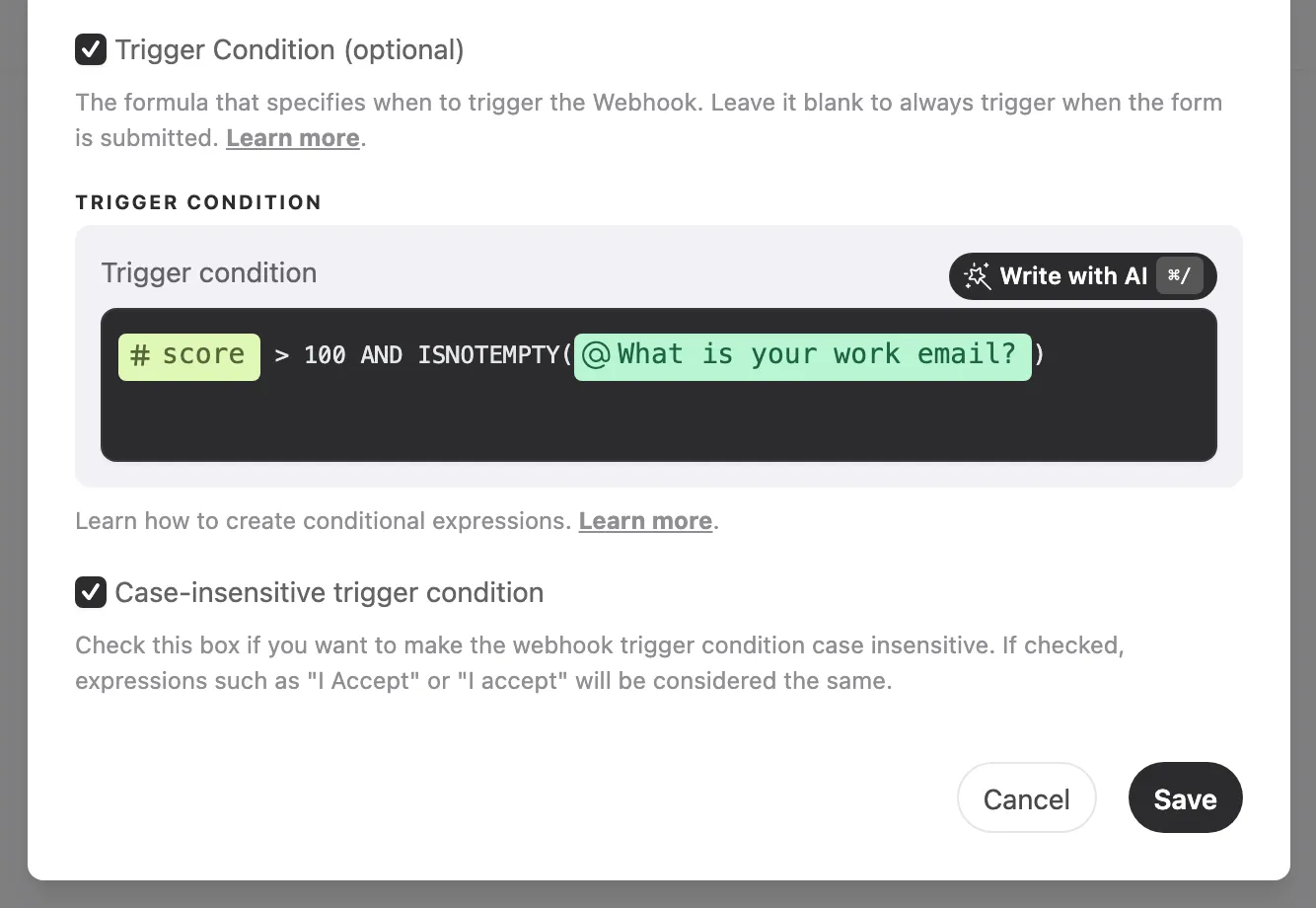
This condition runs the integration only when the score variable passed 100 and the work-email question was answered.
To insert a placeholder, type @ and a menu lists everything you can reference: the form’s questions, hidden fields, UTM parameters, and variables. Select the item from the menu instead of typing its name by hand.
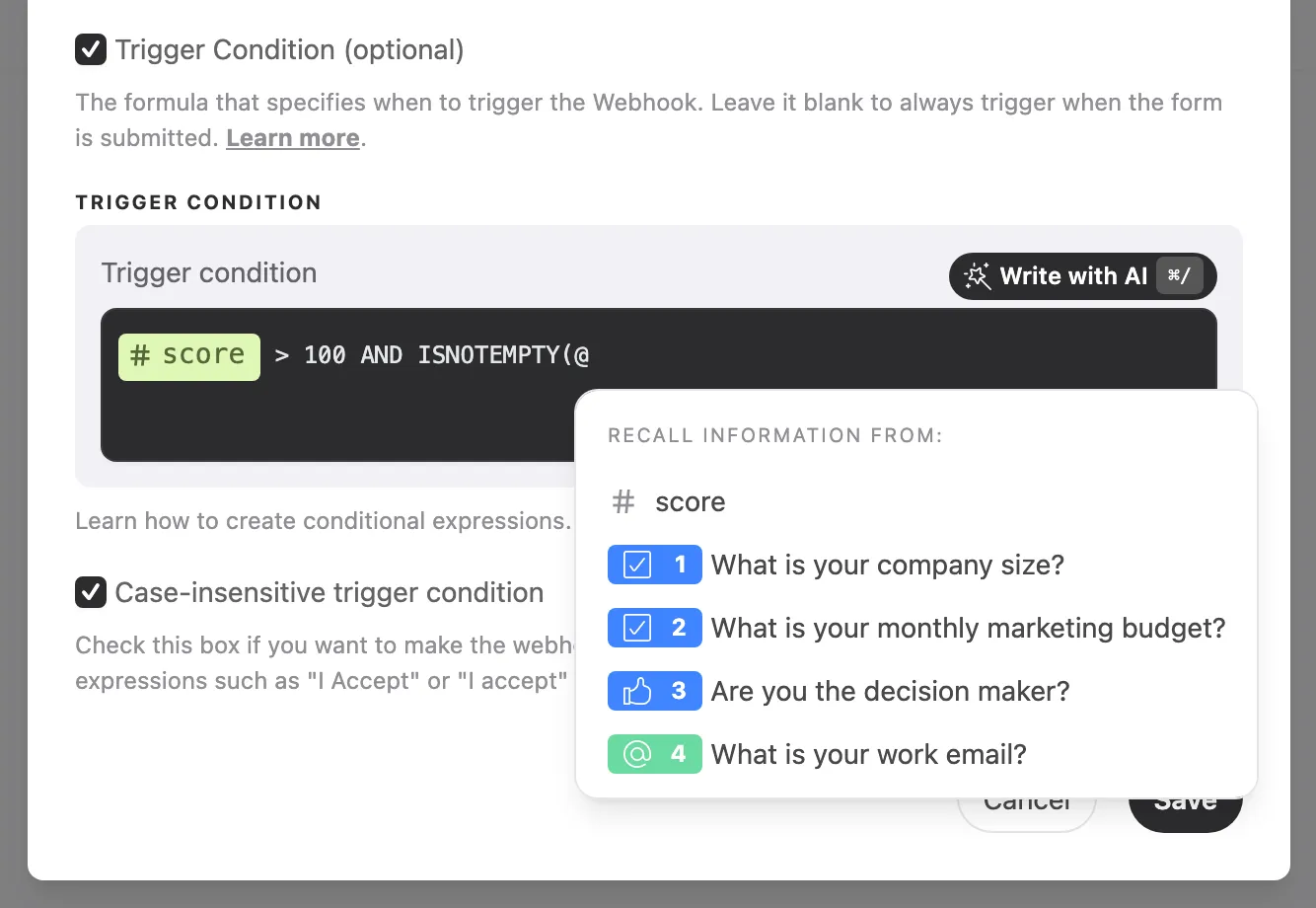
Data you can reference
| Data | Placeholder examples | Where it comes from |
|---|---|---|
| Question answers | @email, @budget | Any question in your form |
| Hidden fields | @plan, @customer_id | Hidden fields configured in the Share tab |
| UTM parameters | @utm_source, @utm_campaign | UTM tracking enabled in the Share tab |
| Variables | @score | Variables created in the Logic panel. Every form includes the score variable by default |
Comparison operators
| Operator | The condition is true when | Example |
|---|---|---|
EQUALS | the answer is exactly the value | @plan EQUALS "Pro" |
CONTAINS | the answer contains the text | @email CONTAINS "@gmail.com" |
> < >= <= | the numbers compare as stated | @score >= 10 |
ISEMPTY(@question) | the question was not answered | ISEMPTY(@coupon) |
ISNOTEMPTY(@question) | the question was answered | ISNOTEMPTY(@phone) |
ISCOMPLETED() | the response was submitted (the form was completed) | ISCOMPLETED() |
ISNOTCOMPLETED() | the response is partial (sent by Send incomplete responses) | ISNOTCOMPLETED() |
ISCOMPLETED() and ISNOTCOMPLETED() take no data: the parentheses stay empty. Type them directly in the field; they don’t appear in the @ menu. They only make a difference when Send incomplete responses is enabled, since without it integrations already run only on submitted responses.
Text values go between double quotes. Numbers work with or without quotes: @score >= 10 and @score >= "10" are equivalent.
Logical operators
| Operator | Use it to | Example |
|---|---|---|
AND | require all conditions | @score >= 10 AND ISNOTEMPTY(@email) |
OR | require at least one condition | @utm_source EQUALS "facebook" OR @utm_source EQUALS "instagram" |
NOT | invert a condition | NOT (@email CONTAINS "@gmail.com") |
Parentheses group conditions and define what is evaluated first, exactly as in math.
Examples
Exact answers
@satisfaction EQUALS "Yes"
Runs when a Yes/No question was answered “Yes”. Yes/No questions always store the answer as “Yes” or “No”, regardless of the form’s language; compare against these two values even in a Portuguese or Spanish form.
@company_size EQUALS "11-50 employees"
Runs when the respondent picked that exact option in a multiple choice question. Write the option label exactly as it appears in the form.
@plan EQUALS "trial"
Runs when the hidden field plan captured the value “trial” from the form’s URL.
@utm_source EQUALS "google"
Runs when the respondent arrived through a link tagged with utm_source=google.
Text contains
@email CONTAINS "@gmail.com"
Runs when the email answer is a Gmail address.
@feedback CONTAINS "refund"
Runs when an open-ended answer mentions “refund” anywhere in the text.
@interests CONTAINS "Marketing"
Runs when “Marketing” is among the selected options. In questions that accept several choices, the answer is stored as a comma-separated list (“Sales, Marketing, Support”), so CONTAINS checks whether an option was selected.
Numbers and score
@score >= 10
Runs when the score variable reached 10 or more. Useful for sending only qualified leads to your CRM.
@age >= 18 AND @age < 65
Runs when the answer to a number question falls inside a range.
Answered or skipped
ISNOTEMPTY(@phone)
Runs only when the phone question was filled. A question the respondent skipped counts as empty.
ISEMPTY(@coupon)
Runs only when the coupon question was left blank.
ISNOTEMPTY(@email) AND ISNOTEMPTY(@phone)
Runs only when both contact fields were filled.
Completed and partial responses
ISCOMPLETED()
Runs only when the respondent submitted the form. Use it on an integration that should ignore the partial responses sent by Send incomplete responses.
ISNOTCOMPLETED()
Runs only for partial responses. Combine both to route each kind to its own destination: give your main webhook the condition ISCOMPLETED() and create a second webhook with ISNOTCOMPLETED() pointing to where partial leads should land, such as another column in your CRM.
ISCOMPLETED() AND @score >= 10
Runs only for submitted responses that also reached the minimum score.
Excluding with NOT
NOT (@email CONTAINS "@gmail.com")
Runs for any email except Gmail addresses. Chain more NOT (... CONTAINS ...) blocks with AND to filter out other free email providers.
NOT (@utm_source EQUALS "google")
Runs for traffic from any source other than Google. Avoid !=; NOT (... EQUALS ...) is the standard way to write “different from” and the form the AI assistant produces.
NOT (@role EQUALS "Student")
Runs when the selected role is anything except “Student”.
Combining conditions
(@utm_source EQUALS "facebook" OR @utm_source EQUALS "instagram") AND @score >= 5
Runs for paid-social respondents with a minimum score. Without the parentheses, AND would be evaluated before OR and change the rule.
(@budget EQUALS "$10k+" OR @score >= 15) AND ISNOTEMPTY(@email)
Runs when the lead qualifies by budget or by score, and only if there is an email to send.
ISEMPTY(@utm_source) OR @utm_source EQUALS "newsletter"
Runs for direct traffic (no UTM captured) or for the newsletter campaign.
Writing rules
Follow these rules when writing expressions:
| Don’t write | Write instead |
|---|---|
@plan = "Pro" | @plan EQUALS "Pro" |
@plan != "Pro" | NOT (@plan EQUALS "Pro") |
@phone ISNOTEMPTY() | ISNOTEMPTY(@phone) |
@consent EQUALS TRUE | ISNOTEMPTY(@consent) |
@score>=10 | @score >= 10 |
- Put spaces around every operator and keyword.
- Comparisons distinguish uppercase from lowercase: “Pro” and “pro” are different values. To ignore the difference, check Case-insensitive trigger condition, shown below the condition field in the integration’s settings. For a new webhook, this option comes pre-checked.
- When the condition is false (or the expression is invalid), the integration is skipped for that response. The integration logs show these responses as voided by trigger condition.
More than one condition
In integrations that support multiple conditions (currently the Facebook Pixel), select Add condition to create additional rules, each with its own name and expression. Each rule fires independently whenever its own condition matches: the Pixel sends one Meta event per matching rule, named after its Custom conversion name. In the other integrations, write a single expression and combine rules with AND and OR.
Conclusion
You learned how to reference answers, hidden fields, UTM parameters, and variables in a trigger condition, which comparison and logical operators are available, and how to combine them with parentheses. If an integration didn’t run when you expected, review the expression against the writing rules above and check the integration logs.
Related articles: