This article will help you customize key settings in Yay! Forms, including the form interface language, visibility of the “Powered by Yay! Forms” badge, closing a form to new responses, AI-based feedback prompts, and sending incomplete responses to an integrated platform.
Customizing form settings
- Log in to your Yay! Forms account and navigate to the form you want to customize.
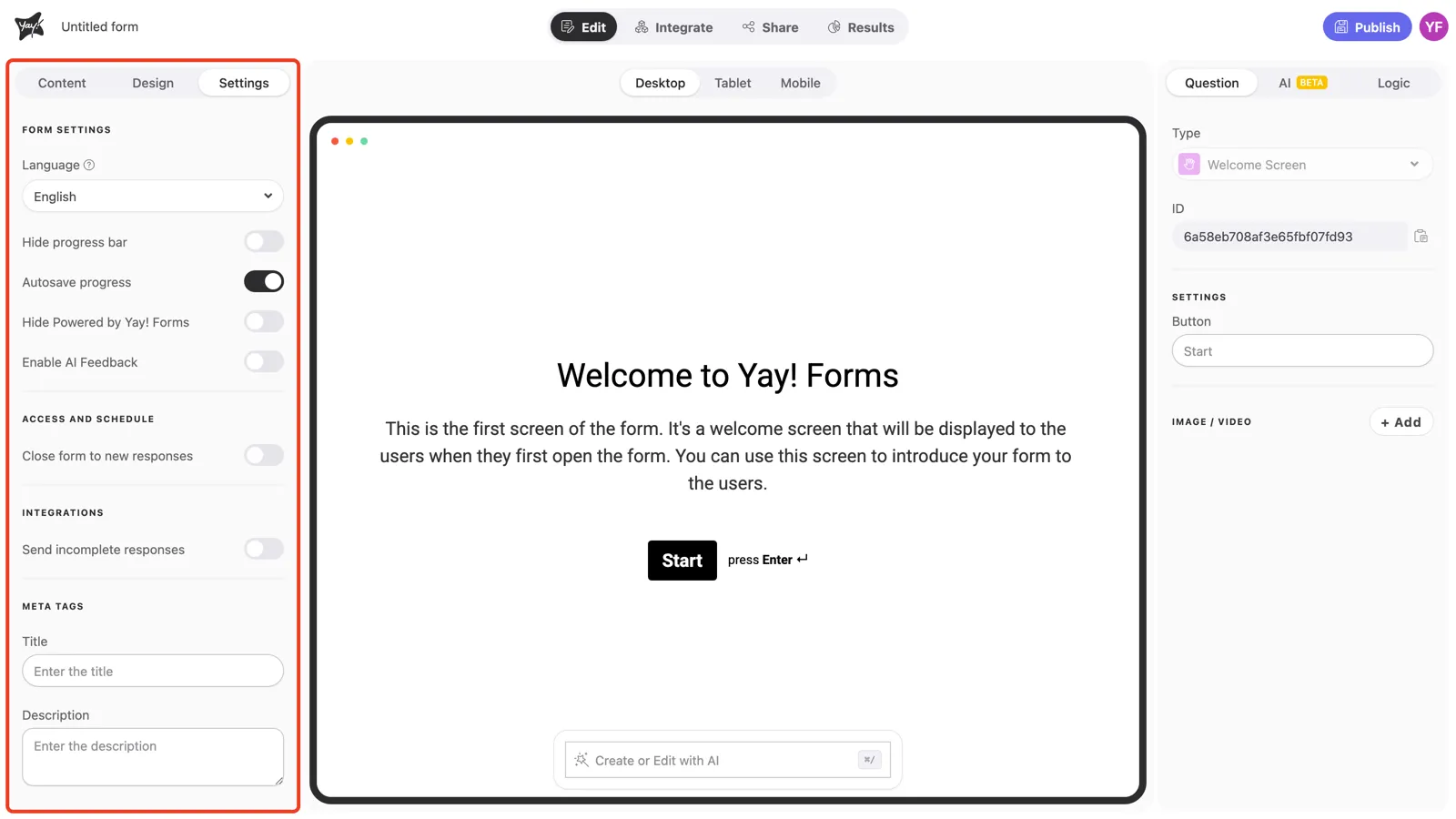
- Open the Settings tab at the top of the editor’s left panel.
- Under Form settings, you’ll find the language option, the progress bar and autosave toggles, the “Powered by Yay! Forms” badge, and AI feedback.
- To change your form’s language, select the desired language from the dropdown menu under Language.
- If you want to hide the “Powered by Yay! Forms” badge on your form, toggle Hide Powered by Yay! Forms (this option is available starting from the Plus plan).
- Yay! Forms lets you close a form to new responses. With this feature, you can easily control when your form will be open or closed to new responses. To close the form, enable Close form to new responses under Access and schedule.
- You can turn on Enable AI Feedback and set up a prompt to generate personalized feedback from responses using artificial intelligence. Learn more.
- Under Integrations, you can enable Send incomplete responses to the integrated platform. If this setting is enabled, you must specify a delay (in minutes). This delay indicates how long to wait before sending the incomplete response. Please note that once the information is sent, if the response is submitted later, the data will not be updated, nor will it be resent to the integrated platform.
- Under Meta tags, you can set the title and description used when the form link is shared.
- After making the desired changes, click the “Publish” button to save your settings.
- Done! Your form settings have now been customized according to your preferences.
Screenshot reference
Notes about language selection and analysis
Conclusion
You now know where to find the Yay! Forms settings and what each option controls, including language, branding, form availability for new responses, AI feedback prompts, and handling of incomplete responses when sending data to an integration.