If your Yay! Forms events do not appear in the Meta Events Manager or in your campaigns, use this diagnostic guide: start by confirming the logs, then use the list below to jump straight to the article that fixes each cause.
Step 1 — Start with the integration logs
Before anything else, confirm what Yay! Forms is actually sending. See how in How to view your integration logs.
- If the
YFSubmitevent shows the “Succeeded” status: the send is working and the problem is on Meta’s side — continue to Step 2. - If you see an error in the log: the integration setup needs adjusting. Review it in How to integrate Yay! Forms with the Facebook/Meta Pixel.
Step 2 — Identify the cause and open the right article
🔒 The event is “Blocked by Meta” (not approved)
This is the most common cause. New custom events (YFSubmit, YFStart, YFView, YFAnswer, YFIncomplete) stay blocked until you approve them manually in Events Manager.
➡️ How to fix Meta Pixel events not appearing in the Facebook Events Manager
🚦 The domain is not allowed in traffic permissions
If an Allow List exists on your pixel and the Yay! Forms domain is not included, Meta silently drops every event — with no error in the logs.
➡️ How to configure traffic permissions for your Meta Pixel
🧪 The integration is still in test mode
If the Test Facebook Pixel Event Code field is filled in on the integration, Meta treats submissions as tests and they do not enter the campaign. Open the pixel integration inside Yay! Forms and clear that field, in the Confirm your Meta setup step.
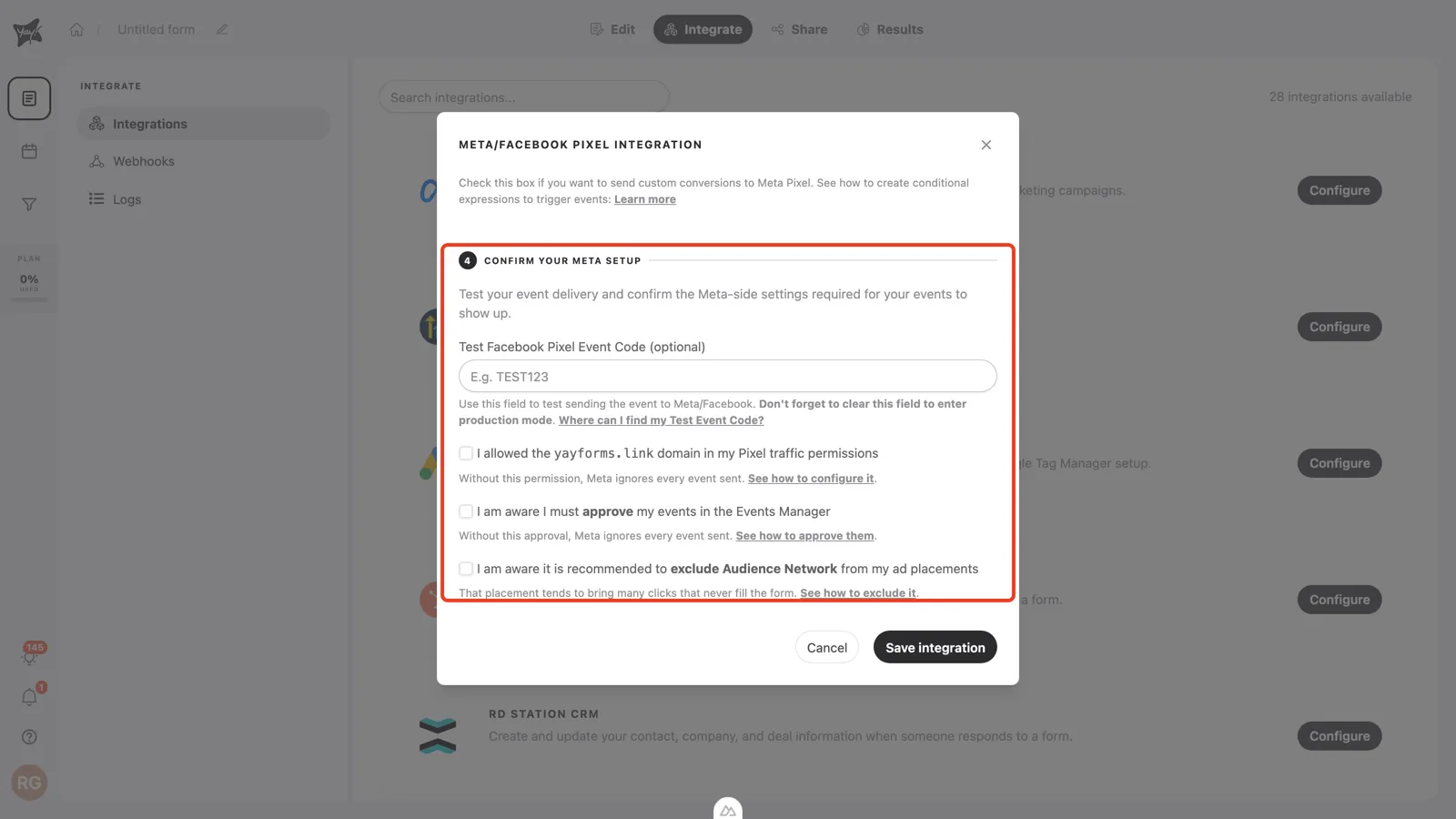
Then just trigger a real submission. More details about test events in How to integrate Yay! Forms with the Facebook/Meta Pixel.
🤝 The assets are not shared with the ad account
If the pixel is not shared with the correct ad account, the events cannot be used in campaigns. In Meta Business Manager, go to Business Settings → Data Sources → Pixels, select the pixel used in Yay! Forms, and share it with the correct ad account.
⏳ Meta is still processing
Even with everything configured, Meta takes time to display events. With a test event code active, check the Test events tab: Meta’s documentation quotes up to ~30 minutes for events to appear there. Without a test code, check the event activity in the Events Manager overview, which takes longer to update (usually a few hours; in some cases 24 to 48 hours). If the other causes are ruled out, wait and check again.
Still not working?
Quickly confirm:
- Is the event approved (not “Blocked by Meta”)?
- Is the Yay! Forms domain in the pixel’s traffic permissions allow list?
- Is the test event field empty in Yay! Forms?
- Are the assets shared with the ad account?
If the problem persists after all these checks, contact Yay! Forms support with your Pixel ID and the form URL.